 Repeat
Add the customer and job
Enter their contact details, the work you carried out and when you want to follow up. Import a CSV or Excel file if you already have a list.
Customer reminders for UK service businesses
Scheduled email and SMS reminders for the next MOT, service, appointment or regular job. Keep your customer list organised, follow up when work is due, and record the bookings you win.
Your first month, discounted
Email £14.99 first month, then £29.99/month · No setup fee · See all plans
How it works
A simple system for the customers who already know your business. Add one customer at a time or start with a spreadsheet.
Enter their contact details, the work you carried out and when you want to follow up. Import a CSV or Excel file if you already have a list.
Select email or, on the Email + SMS plan, a text. Choose the date and wording. An optional further follow-up can be scheduled for the same job.
Customers reply to your business. When someone books, mark the job won and record its value. Further automated reminders for that job stop.
A look inside RepeatJobs
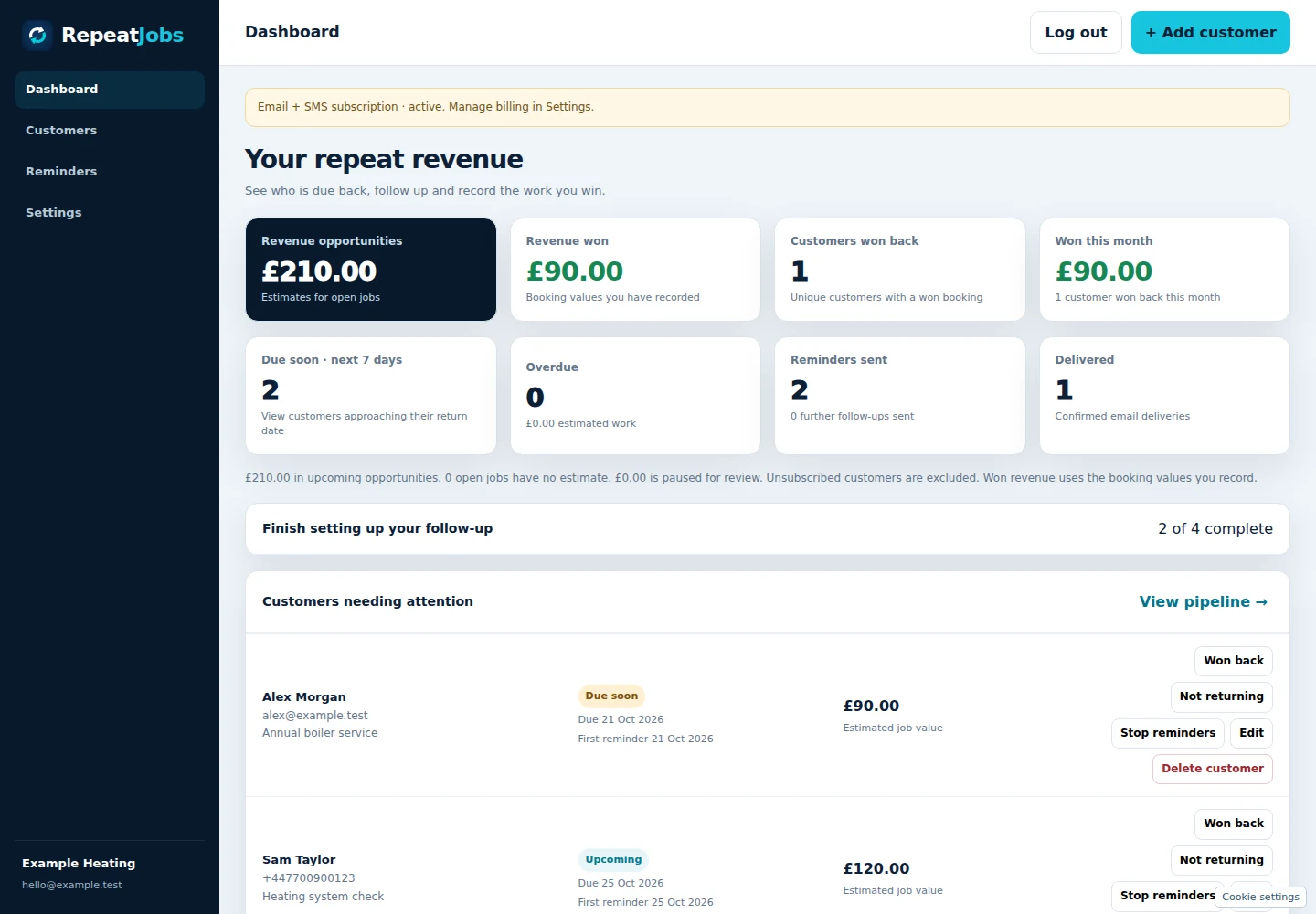
These are screens from the working application, populated only with fictional customers. Explore the customer list, reminder dates and delivery history before you sign up.
Start with one customer or import a spreadsheet. Choose your plan after creating your account.
Create your accountSee the workflow
Follow a fictional boiler service through an email reminder and a recorded repeat booking. Nothing in this example is saved or sent.
Add Alex’s details, the boiler service and the reminder date. In your account, you choose the timing that fits each customer and service.
An estimate helps you see potential work. It is not counted as revenue won until you record a booking.
Scheduled email reminders show your business name followed by “via RepeatJobs”. Replies go to the business email you set in Settings.
On the Email + SMS plan, you can choose a text reminder for a job instead. SMS reminders include your business contact email so recipients can ask to stop texts. Recognised STOP replies pause reminders when the sending number supports replies.
In this example, Alex books another £90 service. You mark the job won and enter the confirmed booking value. RepeatJobs stops further automated follow-ups for that job.
The dashboard separates estimates from the bookings you’ve recorded. It does not assume that every reminder becomes a sale.
One booking manually recorded by the business.
Inside your account
Keep the follow-up, customer information and repeat work together, so you can see what needs attention.
Upload CSV or Excel, match your columns and review the rows before saving. Existing jobs are skipped during import.
Choose the date and channel for each repeat job. See what is upcoming or overdue from your dashboard.
Customise your email subject and message. Replies go directly to the business email you choose in Settings.
Use email for a fuller message or SMS for a short reminder. The Email + SMS plan includes 200 SMS credits each month.
Review reminder activity and email delivery reporting. A delivered message is different from a customer booking.
Keep estimates separate from confirmed booking values. Mark jobs won or lost to stop further automated follow-up for that job.
Built around repeat work
The right timing depends on your service and customer. See an example for your type of business.
Explore more
Check examples, run your own illustrative numbers and meet the business behind RepeatJobs.
Find sample email and SMS wording for services customers come back for. Browse guides →
See how job values, margins and an illustrative number of extra bookings compare with our plans. Use the calculator →
Find out who built the software and why straightforward follow-ups matter. Meet the founder →
Simple plans
Choose the way you want to follow up. Both plans include customer import, your repeat-work pipeline and revenue tracking.
FIRST MONTH · SAVE £15
For businesses following up by email.
Then £29.99/month until cancelled.
Or £299/year, paid upfront.
Save £45.88 against your first 12 monthly payments, including the introductory month.
FIRST MONTH · SAVE £25
For businesses that want to use email and text reminders.
Then £44.99/month until cancelled.
Or £449/year, paid upfront.
Save £65.88 against your first 12 monthly payments, including the introductory month.
The introductory price applies to the first month of a new monthly subscription only. Annual plans are paid upfront and have no introductory-month discount. No setup fee. Creating an account does not charge your card. Stripe shows your selected plan, payment amount and renewal terms before you pay. Subscriptions renew automatically unless cancelled before renewal. Cancel through your billing settings; access normally continues until the end of your paid period.
SMS credits are counted by billable text segment, so a longer message can use more than one credit. Included credits reset monthly and do not roll over. Purchased top-up credits remain until used. Sending pauses when no credits remain. Full plan terms.
Stripe handles payment-card details and subscriptions. You see the charge and renewal terms before paying. Read the plan terms.
Signed-in businesses can access their own records. Service providers help us host the product and deliver messages. See how data is handled.
Ask about setup, billing or a data request through our support form. You can contact us before creating an account. Contact RepeatJobs.
You can explore the interactive example without an account. Creating an account does not charge your card. A paid subscription is required to use the reminder service; this is not a free trial.
Yes. CSV and Excel imports let you match spreadsheet columns and preview rows before saving. You are responsible for having permission or another appropriate lawful basis to contact the customers you add.
Customers see your business name followed by “via RepeatJobs”. You can customise the subject and message, and email replies go to the business email you choose in Settings.
Yes. Email reminders have an unsubscribe link. SMS reminders include your business contact email so customers can ask to stop texts. You must act on those requests promptly by turning off their reminders in your account.
A credit covers one billable text segment. Longer messages can use more than one credit. The Email + SMS plan includes 200 credits each month; an optional £9.99 top-up adds 100. Sending pauses when no credits remain, with no automatic overage charge.
Customers contact your business to arrange the work. You record the booking and its value in RepeatJobs. The service does not automatically turn a delivered reminder into a booking or collect the customer’s payment for that job.
Yes. Open your billing settings to manage the subscription through Stripe. Cancel before renewal to stop the next payment; access normally continues to the end of the current paid period. Cancellation does not automatically delete stored customer information. Contact support for an account deletion request.
You can export customer and scheduled-job details as CSV from Customers. Account deletion requests go through support. See the privacy notice for what may need to be retained.
Bring your customer list together, set the follow-up date and keep track of what happens next.
Email £14.99 first month, then £29.99/month. Creating an account does not start billing.